New Gmail AI features replacing Gemini side panel for some
1. Catchy Headline
Google Kills the Gemini Side Panel: Why Your Gmail AI Just Got “Invisible”
2. Brainx Perspective (Intro)
At Brainx, we believe Google’s decision to axe the Gemini side panel for US subscribers marks a pivotal shift from “AI as an assistant” to “AI as the interface.” This aggressive move to in-line integration highlights a bold gamble: users don’t want to chat about their work; they want the work done for them, seamlessly and invisibly.
3. The News (Body)
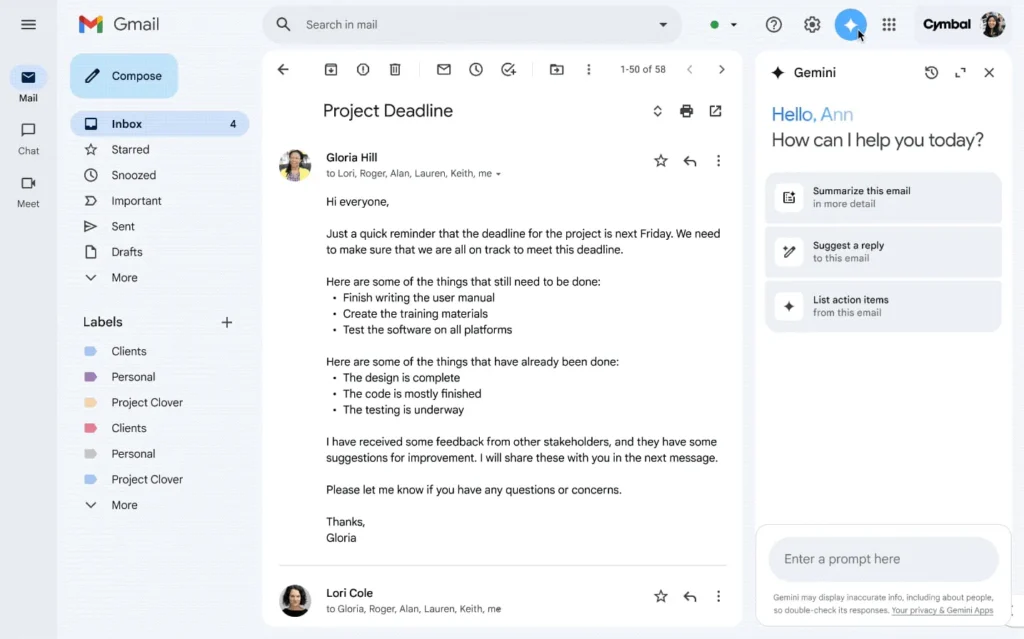
In a move that has surprised many power users, Google has officially begun deprecating the dedicated Gemini side panel in Gmail for its premium AI Pro and AI Ultra subscribers in the United States. This significant UI change signals the end of the “chatbot in the sidebar” era for web users, replacing it with what Google calls “in-line AI experiences.”
While the side panel—accessed via the familiar “sparkle” icon—served as a faithful digital companion for drafting, summarizing, and searching, Google argues that the future of productivity is integrated, not adjacent.
The Death of the Side Panel: What’s Changing?
For months, the Gemini side panel was the command center for AI in Gmail. It lived on the right side of your screen, ready to answer questions, dig through Drive files, or draft emails without cluttering your main view.
According to Google’s latest announcement, this is now history for premium US subscribers. The company stated:
“Subscribers in the US may no longer see Ask Gemini in Gmail or be able to open the Gemini in Gmail side panel.”
What you are losing:
- The Chat Interface: You can no longer have a conversational back-and-forth with Gemini alongside your inbox.
- Quick Drive Access: The ability to instantly “find information from Google Drive files” via the sidebar is being re-routed.
- Calendar Integration: Creating and finding events via the side chat is no longer the primary workflow on the web.
The New Era: “In-Line” AI Experiences
If the side panel is the “old way,” what is the “new way”? Google is betting on Contextual Integration. Instead of opening a separate panel to ask for help, the AI now lives inside the email threads and compose windows.
Key Features of the New System:
- AI Overviews for Threads: Instead of asking a chatbot to “summarize this email,” you will now see an automatic AI Overview at the top of long email threads. This feature mimics the AI Overviews recently introduced in Google Search, providing a concise, bulleted summary of complex conversations without user prompting.
- Enhanced “Help Me Write”: The “Help Me Write” button remains the centerpiece of email composition. It has been refined to be faster and more context-aware, allowing you to generate drafts, formalize rough notes, or shorten lengthy rants into professional prose directly in the compose box.
- “Proofread” on Steroids: The new Proofread feature is no longer just a spellchecker. It now acts as a comprehensive style editor, offering suggestions on tone, clarity, and grammar that rival dedicated tools like Grammarly. It works passively as you type, underlining suggestions in real-time.
- Context-Aware Suggested Replies: Smart Reply has existed for years, but the new Gemini-powered version reads the entire thread history to suggest nuanced, full-sentence responses that actually sound like you, rather than generic one-liners like “Received, thanks.”
Why the Split? Mobile vs. Web vs. Workspace
One of the most confusing aspects of this update is its fragmented rollout. It is crucial to understand that this change does not apply to everyone yet.
- Personal AI Subscribers (US): The side panel is gone. You are the test subjects for the new “in-line” future.
- Google Workspace (Business) Users: No changes. The side panel remains fully functional. Google likely wants to avoid disrupting enterprise workflows that rely on the sidebar for cross-referencing Drive documents during work.
- Mobile Users (Android/iOS): The side panel survives here. On mobile, screen real estate is limited, so having a dedicated “Ask Gemini” button makes more UI sense than cluttering the small reading pane with in-line tools.
The Strategic “Why”: Friction vs. Function
Why would Google remove a feature that people paid for? The answer lies in User Experience (UX) Friction.
Data likely showed Google that users found it cumbersome to:
- Read an email.
- Click a button to open a sidebar.
- Type a prompt (“Summarize this”).
- Read the answer in a separate window.
By moving these features in-line, Google removes steps 2 and 3. The summary is just there. The proofreading happens as you type. It transforms AI from a “tool you use” into a “layer that exists.”
However, this shift has a downside. The side panel was a “Sandbox”—a place to experiment, ask random questions (“What time is my flight based on that email from 3 months ago?”), or brainstorm without touching the email draft. Losing that sandbox forces users to rely solely on Google’s predictive algorithms, which—while powerful—are not always perfect.
The “Subscription” Confusion
This update specifically targets AI Pro and AI Ultra subscribers. These are users paying $20/month (part of the Google One AI Premium plan) for the most advanced Gemini models (Gemini 1.5 Pro).
It is a bold move to remove features for your highest-paying customers first. Usually, premium users get more features, not fewer. Google’s logic is likely that these power users are the most adaptable and will benefit most from the efficiency of in-line tools. However, early forums and feedback suggest a mixed reaction, with many missing the flexibility of the chat sidebar.
4. “Why It Matters” (Conclusion)
This update matters because it signals the “disappearance” of AI. We are moving past the novelty phase of chatting with bots. For the common man, this means email will simply become “smarter” automatically—summarizing drama-filled HOA threads and fixing typos without being asked. It is the beginning of invisible, ambient computing.
Extended Analysis: The Battle for the Inbox
(Deep Dive for Tech Enthusiasts)
1. The “Copilot” Comparison Google is not operating in a vacuum. Microsoft’s Copilot in Outlook heavily relies on a side-panel architecture. By ditching the side panel, Google is differentiating its product philosophy. Microsoft treats AI as a “Co-pilot” (someone sitting next to you); Google is treating AI as the “Engine” (something powering the car). If Google’s in-line implementation succeeds, it could make Outlook’s sidebar feel clunky and dated by comparison.
2. The Privacy Implication In-line AI scanning every thread to generate automatic “AI Overviews” implies a deeper level of active processing. While Google assures users that data is not used for ad targeting for premium subscribers, the opt-out nature of in-line features (vs. the opt-in nature of opening a sidebar) changes the privacy dynamic. You are no longer choosing to invoke AI; the AI is reading alongside you by default.
3. The Loss of “Multi-Modal” Workflows The biggest casualty of the side panel’s death is the cross-app workflow. The side panel was excellent at connecting dots: “Find the PDF from John and summarize it while I write this email to Sarah.” In-line tools are often single-task focused (e.g., “Summarize this email”). It remains to be seen if the new Search features can replicate the complex, multi-source retrieval that the side panel excelled at. If not, power users might find themselves opening multiple tabs—a distinct step backward in productivity.
4. What Should Users Do? If you are an AI Premium subscriber missing the side panel:
- Lean into the Mobile App: Use the Gmail Android app for complex queries, as the “Q&A” button there still functions like the old sidebar.
- Use Gemini.google.com: Keep a pinned tab of the main Gemini web app. You can copy-paste email text there for complex analysis, though it lacks the direct inbox integration.
- Wait for “Q&A” Updates: Google has hinted that advanced “Q&A” features (asking questions about your inbox) will eventually find a home in the web search bar, merging the functionality of the side panel into the global search experience.
In summary, Google is betting the house that speed beats flexibility. They are wagering that saving you 5 seconds on every email summary is worth sacrificing the deep-dive capabilities of a sidebar chat. Only time—and user feedback—will tell if that bet pays off.
Frequently Asked Questions (FAQ)
Q1: I am a free Gmail user. Does this affect me? No. This specific change is currently for paid AI Pro and AI Ultra subscribers in the US. However, features like “Smart Reply” and basic spam filtering for free users rely on similar underlying tech, just without the generative text capabilities.
Q2: Can I get the side panel back? Currently, there is no “toggle” to bring it back for affected accounts. Google is treating this as a permanent interface upgrade, not an optional test.
Q3: Does this affect Google Docs or Drive? No. The update specifically mentions Gmail. The Gemini side panel in Google Docs, Sheets, Slides, and Drive remains a core part of the “Workspace” experience, as those tools require a different type of collaboration (generating text, analyzing data) where a sidebar is still superior.
Q4: Is “Help Me Write” better now? Yes. The underlying models (Gemini 1.5 Pro) are constantly being updated. The new in-line version is faster and better at mimicking your personal tone, provided you have given it enough examples in your sent folder to learn from.
Q5: Why does my work email still have the side panel? Enterprise (Workspace) accounts are on a slower, more controlled update track. Businesses prioritize stability over cutting-edge UI changes. Additionally, the sidebar is often tied to specific enterprise data controls that in-line features might not yet support.
Leave a Reply